![basis-clear-vertical-1.png]](https://help.wearebasis.com/hs-fs/hubfs/basis-clear-vertical-1.png?height=40&name=basis-clear-vertical-1.png)
You can rename any circuit yourself in the Basis Home app, so "Power" becomes something you'll actually recognise: Master bedroom, Gigi's room, Kitchen, Garage. Renaming happens in the circuit view, by selecting the settings icon.
Before you start
- Have the Basis Home app open on your phone and be signed in to your account.
- It helps to know which circuit does what. If you're not sure, switch a circuit to standby and see what turns off, or check the labels your electrician added during installation.
Steps
- Open the circuit view — the second tab from the left.
- Select the circuit you want to rename
- Tap the settings icon next to the standby button.
- Tap the circuit label at the top of the screen.
- Type the name you want, then save.
- Repeat for any other circuits you'd like to rename.
Tip: Keep names short and specific. Character limit 20. The room or the appliance, whichever you'd search for first. Hot water, Heat pump, Pool and Gigi's room all read more clearly at a glance than Power.
Note: Renaming a circuit changes what you see in the app. It doesn't change anything in the panel itself, and it doesn't change the labels your electrician added, those stay as they are under Panel details.
What you'll see
Your new name replaces the old one straight away, and appears everywhere that circuit shows up in the app, including your usage breakdowns, routines and notifications. If a name doesn't fit, tap it again and change it as often as you like.
Renaming vs. tagging
Renaming gives a circuit one clear name. Circuit tags are a separate feature that let you add several labels to the same circuit, a location, an appliance, or a custom tag of your own. So you can group circuits in ways that suit your home. Most people rename first, then add tags if they want more detail.
More in Circuit tags click here
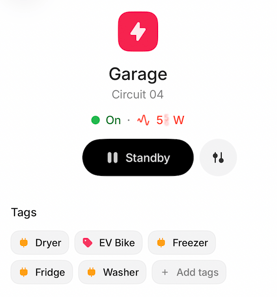
Example:
-
Circuit Label: Garage
-
Circuit Tag: Dryer, EV Bike, Freezer, Fridge, Washer